'%3e%3cpath%20fill='%23FD7419'%20d='M650%20442%20L868%20526%20H1180%20V970%20H650%20Z'/%3e%3cpath%20fill='%23C86020'%20d='M981%20716%20L1180%20774%20V970%20H650%20V784%20H908%20C954%20784%20990%20768%20990%20738%20C990%20729%20987%20722%20981%20716%20Z'/%3e%3cpath%20fill='%23FCB58D'%20d='M650%20700%20H908%20V970%20H650%20Z'/%3e%3c/g%3e%3c/svg%3e)
Tenants & leases · 6 min
Create a rental agreement
Period, rent, deposit, utilities, common costs and billing defaults.
Create a lease on the property's Bérleti szerződés tab with Új szerződés (New lease). The form is split into blocks.
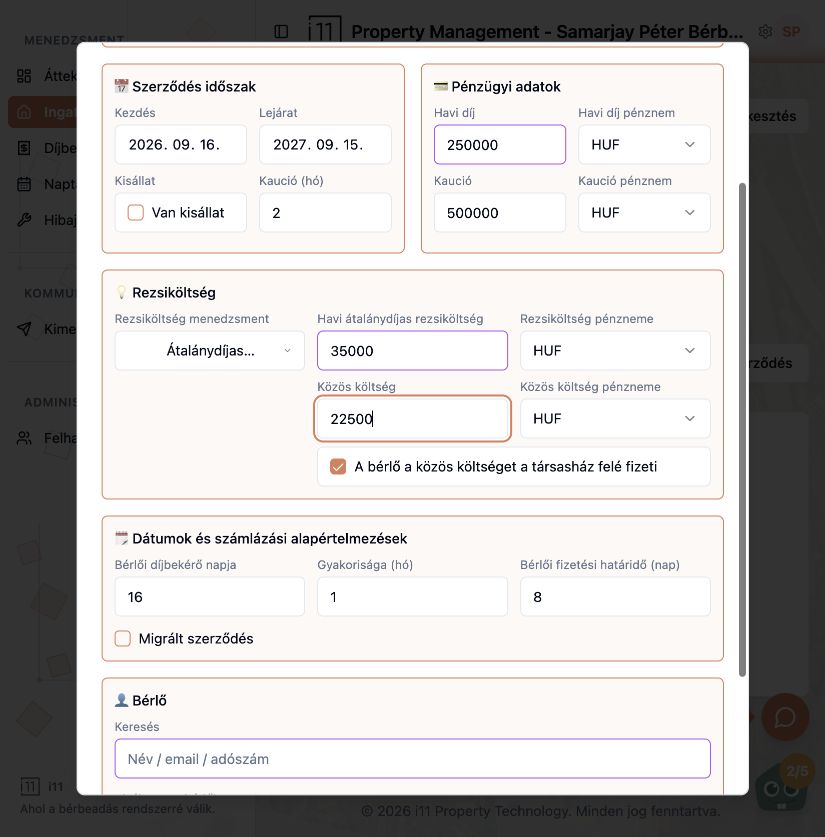
Lease period and financials
Enter start and end dates, monthly rent and currency, and the deposit amount and how many months of rent it covers. Tick Van kisállat if the tenant keeps a pet.
Utilities
Choose how utilities are handled (e.g. Átalánydíjas, flat rate), then enter the monthly flat fee and the common cost. If the tenant pays common costs directly to the building, tick A bérlő a közös költséget a társasház felé fizeti.
Dates and billing defaults
Set the tenant's billing day (e.g. the 16th), frequency in months and payment window in days. When recording an earlier agreement, tick Migrált szerződés (Migrated lease).
Choosing the tenant
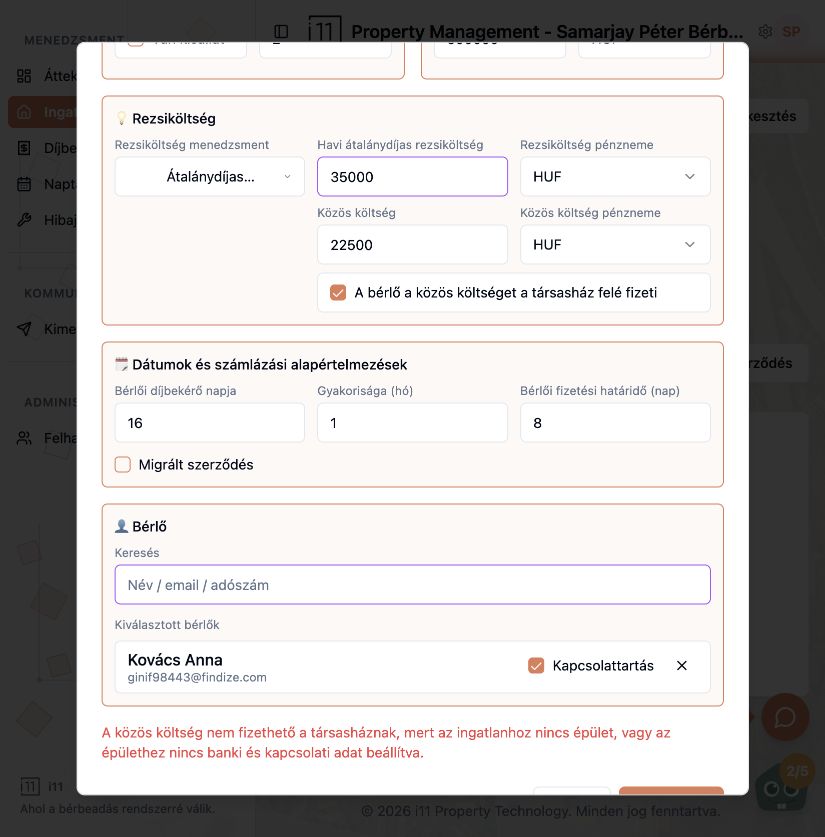
In the Bérlő block search by name, email or tax number, or create a new tenant (type, name, contact, communication language, email, phone). The Kapcsolattartás tick marks who receives notifications.
Common error: common costs paid to the building
If the tenant pays the building directly but the property has no building, or the building lacks bank and contact details, saving is blocked. Untick the option or add the building details first.
Ask about this article
Still have a question? Send it to us and we will receive it together with the article reference.
Start using RentalSys for free
Put the guide into practice with your own property.
- No credit card required
- Free tier included
- 3-minute setup